
CRM Management: 7 Proven Strategies to Grow Your Agency
CRM management is the difference between an agency that chases leads and an agency that closes them. If your contacts live in spreadsheets, inboxes and sticky notes, you are losing deals every single week without realizing it. In this complete guide, you will learn what CRM management really means, why it matters, and how to run your GoHighLevel CRM like a well-oiled machine, step by step.
At GHL Gurus, our certified GoHighLevel specialists have helped hundreds of agencies fix messy pipelines, automate follow-ups and build systems that work around the clock. Everything below comes from real projects and real client work, not theory.
🎯 Key Takeaways
- CRM management is an ongoing process, not a one-time setup.
- Clean data, a simple pipeline and smart automation deliver the biggest wins.
- Instant follow-up is the easiest way to win more leads.
- A quarterly audit keeps your system fast, accurate and trusted by your team.
- GoHighLevel puts every tool you need in one place, and experts can set it up for you.
 Table of Contents
- What Is CRM Management?
- Why CRM Management Matters for Your Agency
- Manual vs. Managed CRM: What Changes
- 7 Proven CRM Management Strategies
- How to Set Up CRM Management in GoHighLevel, Step by Step
- Common CRM Management Mistakes to Avoid
- Your Quarterly CRM Audit Checklist
- How GoHighLevel Simplifies CRM Management
- Should You Hire a CRM Management Expert?
- Frequently Asked Questions
🧠 What Is CRM Management?
CRM management is the ongoing process of organizing, maintaining and optimizing your customer relationship management system so it supports sales, marketing and customer service. It covers far more than storing names and phone numbers. It includes how leads enter your system, how they move through your pipeline, which automations trigger and how your team follows up.
Think of your CRM as a garden. Installing the software is just planting the seeds. Real upkeep is the watering, weeding and pruning that makes everything grow. Without it, even the most powerful platform turns into a cluttered database nobody trusts.
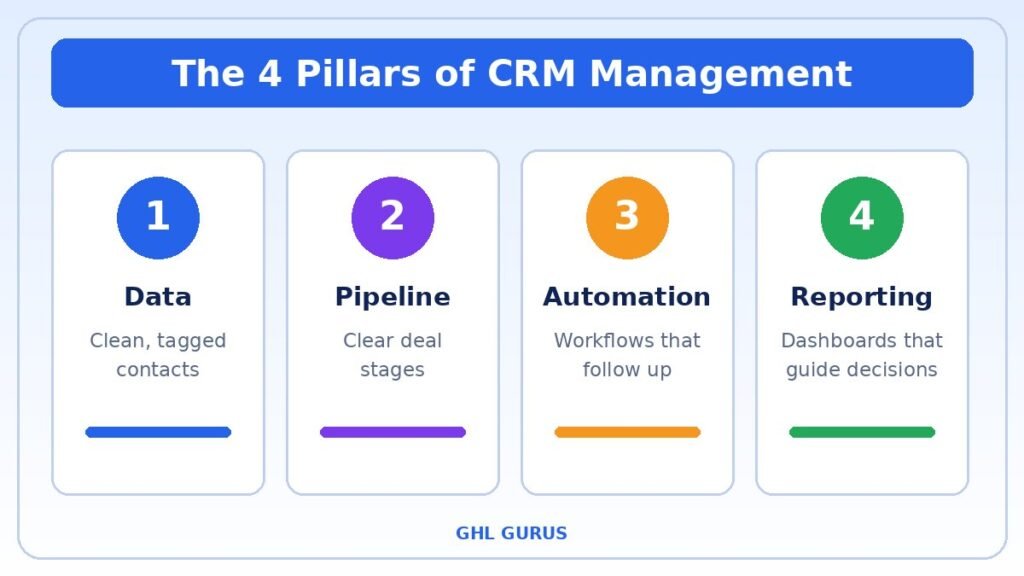
Effective CRM management usually includes four core areas:
- Data management: clean, tagged and de-duplicated contact records.
- Pipeline management: clear stages that show exactly where every deal stands.
- Automation: workflows that nurture leads and remove manual tasks.
- Reporting: dashboards that show what is working and what is not.
When these four areas work together, your team always knows who to contact, what to say and when to say it. That clarity is what turns a CRM from a digital address book into a real growth engine.
🚀 Why CRM Management Matters for Your Agency
Many agency owners buy a CRM and expect results on day one. The truth is that a neglected CRM costs you time, money and trust. Strong CRM management gives you a measurable edge in several ways.
1. You Never Lose a Lead
When every inquiry lands in one place and triggers an instant response, leads stop slipping through the cracks. Speed matters, and an automated reply within minutes beats a manual reply the next day. Prospects usually go with the business that answers first.
2. Your Team Saves Hours Every Week
A tidy CRM removes repetitive work such as copying data between tools, sending reminders and updating deal stages. Your team can spend that time on conversations that actually earn revenue. Many of our clients report saving 20 or more hours a week after we rebuilt their workflows.
3. You Make Decisions With Real Data
Accurate reports show your best lead sources, your average sales cycle and your conversion rate at each stage. Instead of guessing where to spend your ad budget, you invest in what works and cut what does not.
4. Your Customers Get a Better Experience
When your whole team can see the full history of every conversation, customers never have to repeat themselves. Personalized messages, on-time reminders and quick replies build trust and make people more likely to buy again and refer others.
⚖️ Manual vs. Managed CRM: What Changes
The easiest way to see the value of CRM management is to compare a neglected setup with a well-managed one.
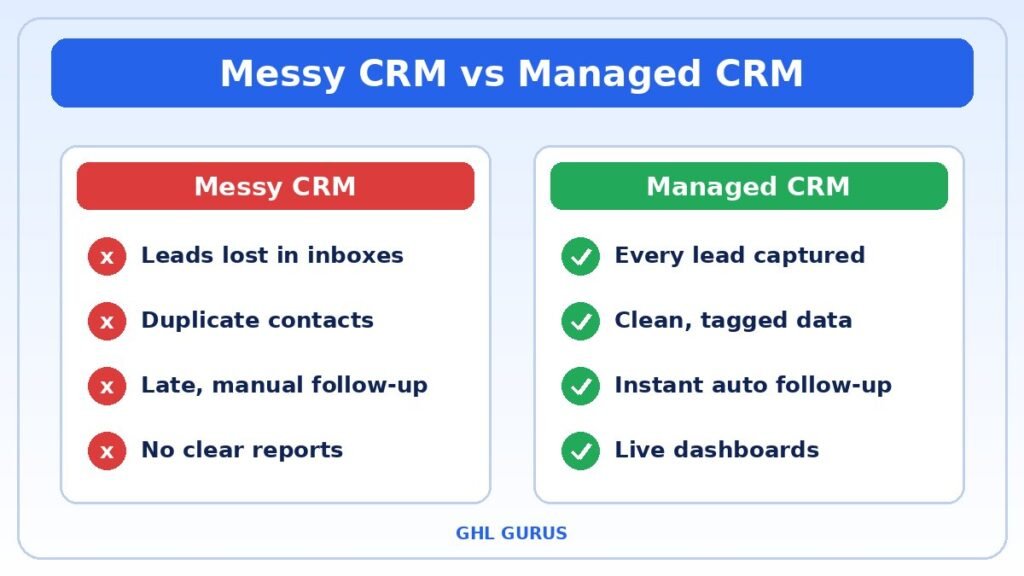
| Area | Neglected CRM | Well-managed CRM |
|---|---|---|
| Lead response | Hours or days, done by hand | Seconds, fully automated |
| Contact data | Duplicates and missing fields | Clean, tagged and consistent |
| Pipeline | Confusing, too many stages | 5 to 7 clear stages |
| Follow-up | Forgotten or inconsistent | Automatic sequences |
| Reporting | Guesswork | Live dashboards |
| Team confidence | Low, people avoid the system | High, everyone uses it daily |
✅ 7 Proven CRM Management Strategies
Use these seven strategies as a checklist. Even implementing three or four of them will noticeably improve your results.
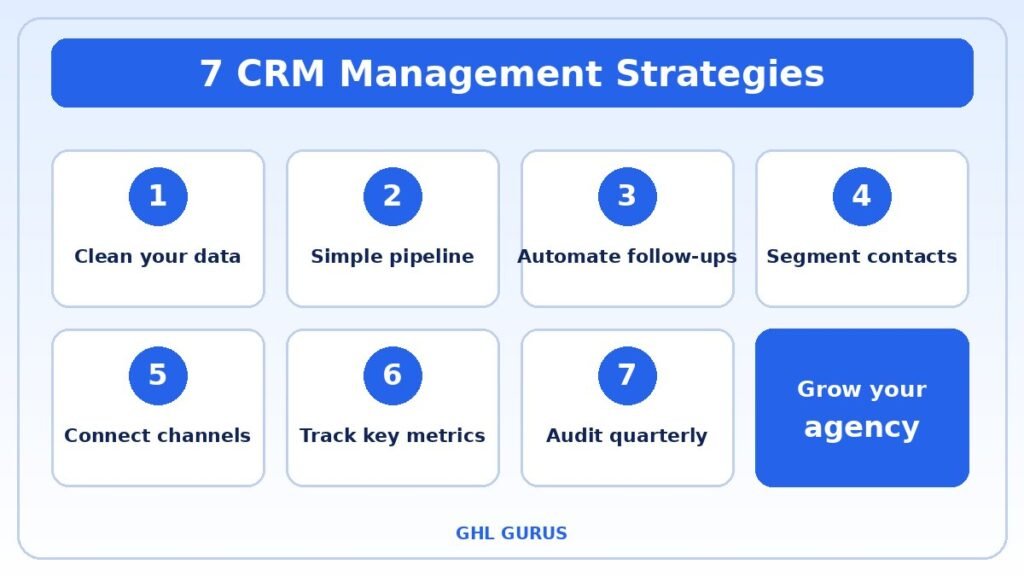
Strategy 1: Clean and Organize Your Contact Data
Dirty data is the number one enemy of a healthy CRM. Start by removing duplicates, fixing incomplete records and standardizing how names, phone numbers and emails are entered. Then create a consistent tagging system, for example by lead source, service interest and customer status.
A good rule is to decide on your tags once, write them down and share the list with your team. A clean database makes every other strategy work better.
Strategy 2: Build a Simple, Clear Sales Pipeline
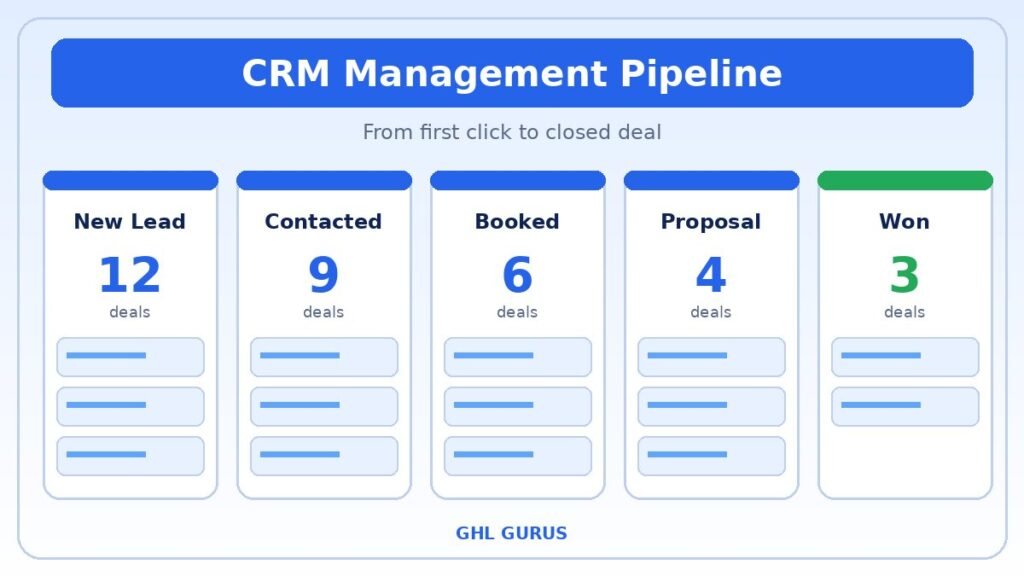
A pipeline with fifteen stages confuses everyone. Aim for five to seven stages that mirror your real sales process, such as New Lead, Contacted, Appointment Booked, Proposal Sent, Won and Lost. Each stage should have a clear definition so your team always knows what to do next.
If a deal sits in one stage for too long, set an automatic reminder so someone follows up before it goes cold.
Strategy 3: Automate Follow-Ups With Workflows
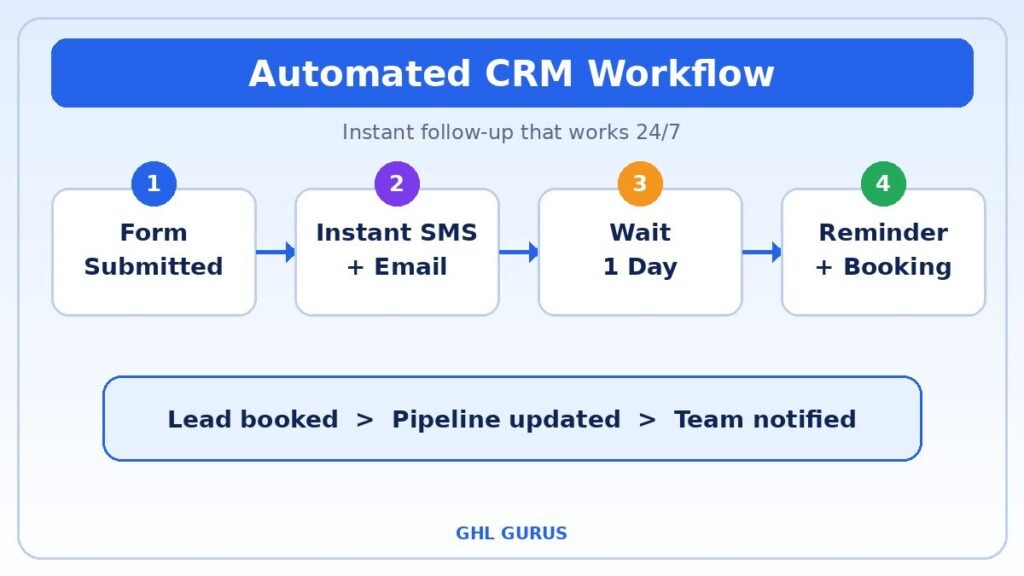
Manual follow-up is where most deals die. With GoHighLevel workflow automation, you can send an instant text and email when a form is submitted, remind leads before appointments and re-engage cold contacts automatically. Automation is the heart of a modern CRM because it works even when your team is offline. Learn more about our GHL workflow automation services.
Strategy 4: Segment Your Contacts
Not every contact needs the same message. Segment your audience by behavior, interest, location or purchase history. A new lead should receive a very different sequence than a past client who is ready for an upsell. Segmentation raises open rates, reply rates and conversions, and it makes your marketing feel personal instead of generic.
Strategy 5: Connect Every Communication Channel
Your leads reach out through email, SMS, Facebook Messenger, Instagram, web chat and phone calls. A connected setup brings all of those conversations into a single inbox so nothing is missed and your team has full context. Adding an AI chatbot can even qualify leads and book appointments 24/7, so you capture opportunities at night and on weekends.
Strategy 6: Track the Right Metrics
You cannot improve what you do not measure. Review these numbers on a regular schedule:
- Lead response time
- Conversion rate by pipeline stage
- Cost per lead and cost per acquisition
- Average deal value and sales cycle length
- Customer retention and repeat purchase rate
Keep your dashboard simple. Five to eight numbers that you actually review every week are far more valuable than fifty numbers nobody reads.
Strategy 7: Audit Your CRM Every Quarter
Businesses change, and your CRM must change with them. Every quarter, review your pipelines, retire unused workflows, archive inactive contacts and check that your integrations still work. A short audit prevents small problems from becoming expensive ones. Use the checklist later in this guide to make it quick.
 How to Set Up CRM Management in GoHigh Level, Step by Step
If you are starting from scratch or rebuilding a messy account, follow this simple order. It mirrors the process we use for our own clients.
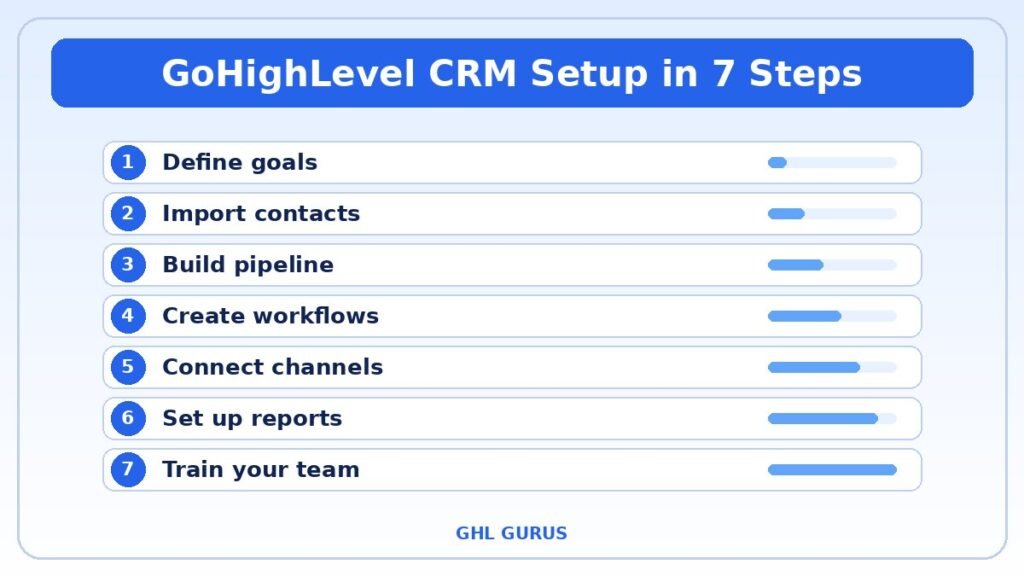
Step 1: Define Your Goals
Write down what you want your CRM to do. For example: respond to every lead within five minutes, book more discovery calls, or reduce no-shows. Clear goals make every later decision easier.
Step 2: Import and Clean Your Contacts
Export your contacts from old tools, remove duplicates, and import them into GoHighLevel with the right tags and fields. Map each column carefully so no data is lost.
Step 3: Create Your Pipeline
Build one pipeline that matches your real sales process. Name each stage clearly and assign an owner so every opportunity has someone responsible for it.
Step 4: Build Your Core Workflows
Start with the essentials: new lead follow-up, appointment reminders, missed-call text back, and a re-engagement sequence for cold leads. Test each one by submitting a form yourself.
Step 5: Connect Your Channels
Link your phone number, email domain, Facebook and Instagram pages, and website forms so every conversation appears in one inbox.
Step 6: Set Up Reporting
Create a dashboard with your key metrics. Schedule a weekly review so the numbers actually lead to decisions.
Step 7: Train Your Team
Walk everyone through the system, show them where to find their tasks and explain the rules for updating deals. Adoption is what makes CRM management succeed long term.
⚠️ Common CRM Management Mistakes to Avoid
Even experienced teams make errors that weaken their results. Watch out for these common pitfalls:
- Too many custom fields: more fields do not mean better data. Keep only what you actually use.
- No ownership: if nobody owns the CRM, nobody maintains it.
- Skipping training: a powerful system fails when the team does not know how to use it.
- Over-automating: automation should feel personal. Test every sequence from the customer’s point of view.
- Ignoring reports: data is only useful when someone reads it and acts on it.
- Never cleaning up: old tags, dead workflows and inactive contacts slow your system and confuse your team.
📋 Your Quarterly CRM Audit Checklist
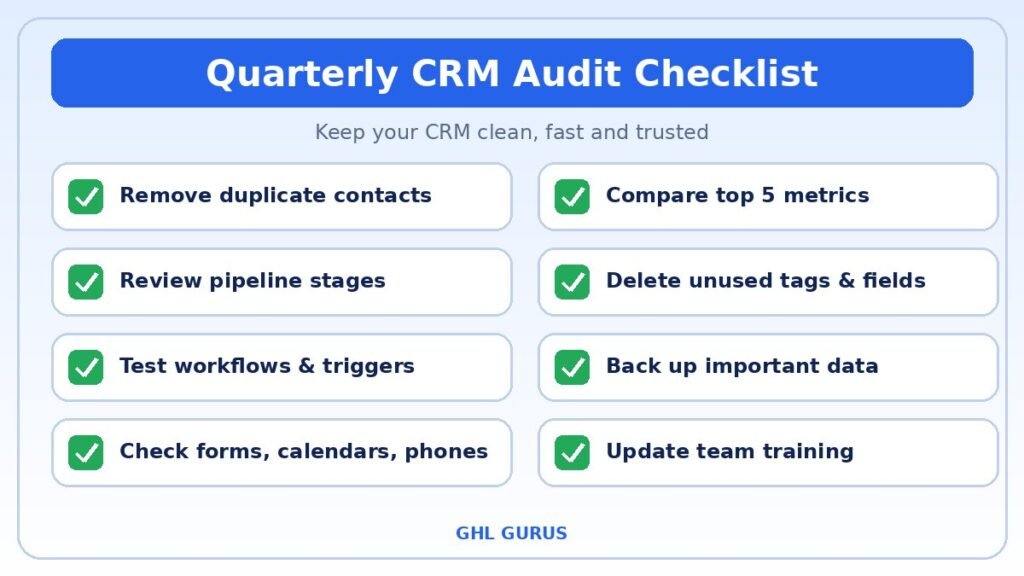
- Remove duplicate and outdated contacts
- Review every pipeline stage and its definition
- Check that all workflows still trigger correctly
- Test forms, calendars and phone numbers
- Review your top five metrics against last quarter
- Remove unused tags, fields and users
- Back up important data
 How GoHighLevel Simplifies CRM Management
GoHighLevel is an all-in-one platform that combines CRM, funnels, email and SMS marketing, calendars, reputation tools and automation in a single dashboard. Instead of paying for five separate tools, agencies manage everything from one login.
For this purpose, GoHighLevel offers:
- Visual pipelines with drag-and-drop deal management.
- Smart lists and tags for fast segmentation.
- Workflow builder for powerful, no-code automation.
- Unified conversations across SMS, email, social and calls.
- Reporting dashboards that track leads, appointments and revenue.
The platform is powerful, but it has a learning curve. That is why many agencies work with specialists who already know the best practices. You can see how we help on our GHL CRM management page.
🤝 Should You Hire a CRM Management Expert?
If you are spending more time fixing your CRM than using it, the answer is probably yes. A dedicated expert can set up your account correctly, build automations that convert and keep everything clean as you grow. This frees you to focus on clients and strategy.
Signs it is time to get help:
- Leads are slipping through the cracks.
- Your team avoids using the system.
- Workflows break and nobody knows why.
- You do not trust your reports.
- You are growing and the setup cannot keep up.
At GHL Gurus, our packages are built for every stage of growth. Our part-time plan is ideal for steady optimization, our full-time plan gives you a complete GoHighLevel team, and our hourly option covers quick fixes and tweaks with no minimum commitment. Review our pricing and packages to find the right fit.
❓ Frequently Asked Questions About CRM Management
What does CRM management include?
It includes data cleanup, pipeline design, workflow automation, communication tracking, reporting and regular audits. Together, these keep your CRM accurate and useful.
How often should I review my CRM?
Check your dashboards weekly, and run a full audit every quarter. Regular reviews keep your data clean and your automations effective.
Is GoHighLevel a good CRM for agencies?
Yes. GoHighLevel combines a CRM, marketing tools and automation in one platform, which makes it a popular choice for agencies and service businesses.
How long does it take to set up a CRM properly?
A basic setup can be live in a few days. A complete build with custom pipelines, workflows and integrations usually takes one to two weeks, depending on how complex your business is.
Can I manage my CRM myself?
Yes, if you have the time and technical comfort. Many owners start on their own and then bring in an expert to speed things up and avoid costly mistakes.
How much does professional CRM management cost?
Costs depend on your needs. At GHL Gurus, plans start at $8 per hour for quick support and $550 per month for part-time dedicated help.
💡 Final Thoughts
Great results are not about having the fanciest software. They come from clean data, a clear pipeline, smart automation and consistent follow-through. Apply the seven strategies in this guide, and you will turn your CRM into a revenue machine that works every hour of every day.
Ready to stop juggling tools and start scaling? Contact GHL Gurus today and let our certified experts build and manage your GoHighLevel CRM for you.